Posts

Showing posts with the label howto

WhatsApp Dark mode now available for iPhone and Android

Image
Dark mode now available for iPhone and Android  | Shaikh Inside WhatsApp Dark mode now available for iPhone and Android | Shaikh Inside image: blog.whatsapp.com We are very excited to update WhatsApp with the most requested feature from our users everywhere - dark mode. Dark mode for WhatsApp offers a fresh look on a familiar experience. It’s designed to reduce eye strain in low light environments. And we hope it helps prevent  those awkward moments  where your phone lights up the room. When designing dark mode we spent time researching and experimenting with a focus on two particular areas: Readability : When choosing colors, we wanted to minimize eye fatigue and use colors that are closer to the system defaults on iPhone and Android respectively. Information Hierarchy : We wanted to help users easily focus their attention on each screen. We did this by using color and other design elements to make sure the most important information stands out. Us...

Here’s How to Get Your Profile Verified ☑ on Instagram ☑

Image
Here’s How to Get Your Profile Verified ☑ on Instagram ☑ Instagram has  today taken measures  to further secure its billion user-strong platform, where it has finally decided to give you the opportunity to  earn the iconic blue tick  and get your profile verified. Yes, you heard that right. The blue checkmark that had previously been super limited to public figures, brands, and other major profiles is now being opened to the masses. This means you’d no longer have to pester Instagram for that blue tick or head to the black market to buy one for yourself. The image-sharing platform is now giving everyone a chance to prove their authenticity and apply for the verification process using a simple form. Steps To Apply For Verification in Instagram If you’ve been waiting for such an option for the longest time, follow the steps below to apply to get that shiny blue tick next to your name on Instagram: 1. Navigate to your profile, tap the 3 vert...

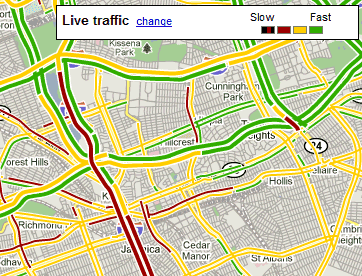
How does Google Maps predict traffic?

Image
How does Google Maps predict traffic? The green, yellow and red routes that Google Maps uses to indicate clear, slow-moving, or heavily congested traffic are a great help when you're trying to determine the fastest way to your destination, but how does Google know the traffic conditions between where you are and where you're trying to go? Google Maps bases its traffic views and faster-route recommendations on two different kinds of information: historical data about the average time it takes to travel a particular section of road at specific times on specific days and real-time data sent by sensors and smart phones that report how fast cars are moving right then Early versions of Google Maps relied only on data from traffic sensors, most of which were installed by government transportation agencies or private companies that specialize in compiling traffic data. Using radar, active infrared or laser radar technology, the sensors are able to detect the size an...